KeUserModeCallback. Elegant way to wait for kernel.
How to utilize (hijack) ntdll to get elegant and nice callbacks from your kernel.
It always have been an issue
Long gone the days of sharing event handles between UM and KM. Let alone inverted call model OSR suggests us to use. Don’t you want something more…. elegant?
The hidden gem in PEB
The PEB has a lot of juicy stuff we can utilize. But something I always wondered about (and never actually researched about) is the KernelCallbackTable. It is an array of PVOIDs that each is a redirector by their indices, which are the API numbers.
So to find pointer to the callback by it’s API number, we just have to do simple math:
APINUM * 8 + CallbackTableAddress
Where the APINUM is the index of the function we want to call. CallbackTableAddress is value of the KernelCallbackTable field of PEB. The expression can be simplified in WinDbg using the apfnDispatch symbol, exported in user32.dll:
u poi((@r8 * 8) + user32!apfnDispatch)
R8 register will contain the API number that will be loaded from stack at ntdll!KiUserCallbackDispatcher, right before call to KiUserCallForwarder.
Why, though?
Win32k GUI driver needs a way to inform the graphical applications (WndProc, especially) about graphics event that happen. If you do a dps user32!apfnDispatch (don’t forget to force load user symbols with .reload /user /f!) when you are in the context of a GUI process, you will see that the callback table is populated by callbacks to user32.dll.
Microsoft makes all their gem hidden beneath undocumented functions. Sigh.
Elegancy, someone said?
Of course, we can be a good boy, allocate virtual memory, copy the table, add our entry, replace the KernelCallbackTable field, and release the lock to add our own callback into the table. But it has its quirks.
GUI applications need to register their callbacks
Let’s find a process that does not have user32.dll loaded. 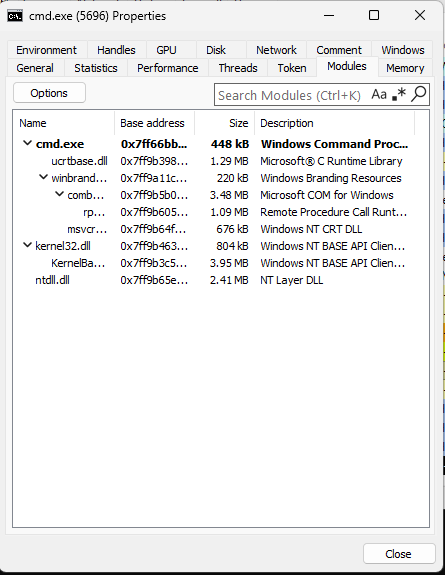
Mmmm.. Clean and beautiful. Just like how we like it. Let’s see its KernelCallbackTable with help of WinDbg. 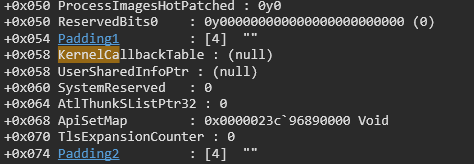
Let alone having user32 callbacks, it isn’t even allocated yet!
This brings us to an issue, do we have to check for PEB periodically, or use WaitOnAddress with a worker thread, or some weirder solution?
Because when user32 loads (implicitly or explicitly), it’s going to DESTROY our custom, beautiful little table and put its weirdo win32k callbacks.
Our callback’s API num will not be steady
After user32 loads, we need to reallocate the callback table. And thus, first few ten entries are unusable for us. Of course, we can get around it by allocating more than we need. But who knows how big the number of APIs for win32k will be?
Given this information, we can see that “good boy” tactics are impractiical. Thus, we will use a more sophisticated (and worse) manuaver to make the event-based communication between kernel to user mode possible.
Hooking ntdll!KiUserCallbackDispatcher
Because why not? If we look at memory section where ntdll is located in, we will see that its protected with write copy access rights. 
What this means is (with bonus info):
- Ntdll is allocated ONCE and for all.
- If a process wishes to change ntdll’s contents, its reallocated at its address space and changes only affect the current process.
- We can hook ntdll :lol:
So how? It’s INDEEED different than our usual hooking procedure. And no, you cannot just use minhook.
We will do even more shady stuff instead.
Vectored Exception Handling.
Vectored exception handling allows the application to handle the exceptions itself. Whether it be an access violation, divide by zero, or an illegal instruction exception.
We will do some very, very shady stuff to hook the beautiful function of ours.
Illegal Instruction Exception
First, we need to obtain address of KiUserCallbackDispatcher. Nice for us, its exported (who thought it was a good idea lol).
1
PUINT8 dispatchAddress = GetProcAddress(GetModuleHandle(L"ntdll"), "KiUserCallbackDispatcher");
Then, we need to add our exception handler.
1
2
// setup exception handler to catch our illegal instruction
AddVectoredExceptionHandler(1, LovelyHandler);
Now, there are a LOT of ways to catch it. Whether it be replacing the instruction with int 0x3, divide by zero, or anything. But after tries of int 0x3, I went with RSM (System Management Resume) instruction. Because it is ALWAYS guaranteed to fail and only requires 2 bytes.
1
2
3
4
5
6
7
8
9
10
11
DWORD oldProtect = 0;
// set RWX rights to modify the KiuserCallbackDispatcher
if (!VirtualProtect((PVOID)((UINT64)dispatchAddress & ~(0xFFF) /*page aligning*/), 4096, PAGE_EXECUTE_READWRITE, &oldProtect)) {
	return GetLastError();
}

TargetFunction = dispatchAddress;

// RSM. this is always guaranteed to throw illegal instruction exception.
dispatchAddress[0] = 0x0F;
dispatchAddress[1] = 0xAA;
Perfect!
Now we neeed to modify our handler to work with this.
Handling the exception
We have 2 problems here
- Handling the exception in case it was a message from our driver.
- Handling the exception in case it was from win32k.
So we need to emulate the work of the first 2 bytes we have replaced. So I mean, it actually works!
Message from our driver.
Very easy. We just have to check for RCX.
1
2
3
4
5
6
7
8
9
10
LONG LovelyHandler(struct _EXCEPTION_POINTERS* info) {
	if (info->ExceptionRecord->ExceptionCode != EXCEPTION_ILLEGAL_INSTRUCTION) {
		return EXCEPTION_CONTINUE_SEARCH; // it is none of our interest
	}

	if (info->ContextRecord->Rip == TargetFunction) {

		if (info->ContextRecord->Rcx == 0x2009) {
			// lovely!
		}
We can use ZwCallbackReturn to return our data. For this purpose, I’ve made a new struct.
1
2
3
4
5
6
7
if (info->ContextRecord->Rcx == 0x2009) {
	// lovely!

	LOVELY_MESSAGE msg;
	msg.Zero = 0x2009;
	ZwCallbackReturn(&msg, sizeof(LOVELY_MESSAGE), 0);
}
Message from win32k.
As good as vectored exception handling is, it lacks VERY important features.
- We cannot advance the
RIPto next instruction. - We cannot even set the context the thread continues to run in!
Those are going to be a problem. But not with some clever windows programming.
When we put RSM instruction, we destroyed the behavior of KiUserCallbackDispatcher. In IDA, we can see the original instruction:

Since we have access to the CONTEXT structure, we can easily emulate that behavior:
1
info->ContextRecord->Rcx = *(PUINT64)(info->ContextRecord->Rsp + 0x20); // mov rcx, dword ptr [rsp+20h]
And sincec we know how much bytes it costs, we can advance the RIP as required.
1
info->ContextRecord->Rip += 5; // advance the ptr to next instruction.
And last but not least, we need to get back to where we were.
1
RtlRestoreContext(info->ContextRecord, NULL); // restore the context, apply the info.
Voila! Perfect! Whatever you call it! Now we need to message to our user-mode software.
The Real Deal
We first need to acquire PEPROCESS for our user-mode software. For now, we can simply use PsGetProcessById. Of course, since this is a demo only, that will work. Then, we need to allocate bytes for our input buffer Then, we need to get into context of the process that made the call. Then, we need to make the call!
1
2
3
4
5
6
7
8
9
10
11
12
13
14
15
16
17
18
19
20
21
22
23
24
25
// attach to the target process' address space so we can use KeUserModeCallback
KeStackAttachProcess(Process, &ApcState);

// alloc memory in user-mode process
Status = ZwAllocateVirtualMemory(NtCurrentProcess(), (PVOID*)&Request, 0, &RegionSize, MEM_COMMIT | MEM_RESERVE, PAGE_READWRITE);
if (!NT_SUCCESS(Status)) {
	DbgPrint("Failed to allocate virtual memory.\n");
	goto end;
}

Request->Constant = 0x2009;
Request->Zero = 0;
Request->Constant2 = 0x9002;

Status = KeUserModeCallback(0x2009, Request, sizeof(LOVELY_MESSAGE), &Response, &ResponseSize);
DbgPrint("KeUserModeCallback: %x\n", Status);

DbgPrint("Received message with size: %ul", ResponseSize);
DbgPrint("Zero must be constant: %ul", Response->Zero);

ZwFreeVirtualMemory(NtCurrentProcess(), (PVOID*)&Request, &RegionSize, MEM_RELEASE);

end:
KeUnstackDetachProcess(&ApcState);
DbgPrint("Status: %x\n", Status);
Not Conclusion
And when we run our driver, we get a…. uh? 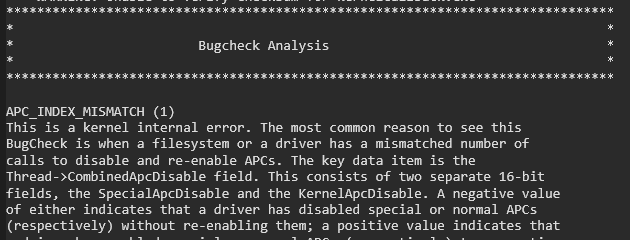
This is because APCs (somehow) are disabled. In IDA, we can see clearly how is this thrown.
1
2
if (CurrentThread->Tcb.ApcStateIndex || CurrentThread->Tcb.WaitBlock[3].SpareLong)
	KeBugCheckEx(1u, retaddr, CurrentThread->Tcb.ApcStateIndex, CurrentThread->Tcb.CombinedApcDisable, 0LL);
So what do we do?
I asked about it in OSR forum here. And explained the problem more.